


Smart Connectivity: Travel Tools to Stay Online Abroad

Traveling abroad has never been easier than it is now. And that’s mainly because of online connectivity, which has made it easy for people to access maps, translation apps, book rides online, book hotels, and so much more.
However, the main question lies in how to stay online. When you stay online incorrectly, you could compromise your safety and privacy while abroad. On the other hand, some online connectivity tools are far more inconvenient than others. Also, there is a risk of connectivity gaps.
So, how do you effectively stay online while abroad? Well, the best way to do that is by using the right travel tools for smart connectivity. Keep reading to learn more about these tools and how they can ensure you stay online seamlessly during your international travel.

Source: Pexels
Picking the right data plan: comparing eSIM vs roaming vs local SIM
In order to stay connected, you’ll need to choose the best data plan. Generally, travelers have three main options: the eSIM, roaming, and a local SIM. Below, we’ll take a look at each option.
eSIM
An eSIM is one of the best options that you can consider for connectivity while traveling abroad. It offers a hassle-free way to activate data plans instantly. What’s more, it requires no physical plastic SIM cards or in-country store visits for the SIM cards.
In addition to that, an eSIM is easy to set up, as all processes are done online. Also, it allows users to switch profiles seamlessly. For instance, if you want to travel from the USA to Peru, you can easily switch to eSIM Peru from eSIM USA. This easy switch ensures seamless connectivity from the moment you land in a new destination.
And when it comes to cost, eSIM providers, such as Holafly, are incredibly transparent about their pricing. This means that you’ll get exactly what you pay for. At the same time, you’ll not get any surprise bills as you would with roaming.
Roaming
Roaming is another option that people have used to stay connected while abroad. The best thing about it is that it comes with the convenience of letting you keep your regular SIM. However, this convenience comes with a price.
Roaming travel data plans are the priciest option you can consider. And many carriers charge high daily, per-MB, or per-minute rates. It's often $5 to $20 per MB or $10/day for limited data. Therefore, if you are planning longer or data-heavy trips, this option may be very expensive.
Local SIMs
A local SIM provides an affordable way for travelers to access data. That’s because its data are at domestic rates. The downside of Local SIMs is that travelers may face issues, such as:
- Language barrier at SIM-selling shops.
- They have to provide IDs for SIM registration.
- They have to constantly swap SIMs at every new destination abroad.
At the same time, the Local SIM can easily get lost during the swap process. Also, it may be stolen. This may pose a risk to your privacy and data, especially if a fraudster gains access to your SIM.
Essential offline apps: maps, translation, emergency info
Smart connectivity is not all about staying online. It's also about being prepared when you are not. During your trip, you may experience connectivity gaps, which may be due to spotty signals in the mountains or a long train ride. You may also want to switch off your data and save it.
Therefore, you need essential offline apps with you. That includes offline maps, translation apps, and emergency info apps. The best offline maps, such as maps.me, Google Maps, and CityMaps2Go, allow you to download regional maps in advance. Therefore, you can easily find the best restaurants, explore cities, and trek in remote areas without data.
In addition to the offline apps, you can also use translation apps, such as Google Translate, offline. Google Translate allows you to download languages ahead of time. So, you can have fast text, voice, and camera translations.
When it comes to emergency info, apps such as SafetyNet, Triplingo, and native device health apps ensure you have offline access to emergency numbers. So, make sure you have these apps before your travels begin.
Tech gear for connectivity: power banks, signal boosters, portable Wi-Fi
Source: Unsplash
Having the right data plan and necessary apps is vital for staying connected. However, without power or a strong signal, they can be useless. Therefore, you need to have the right tech gear for seamless connectivity while abroad.
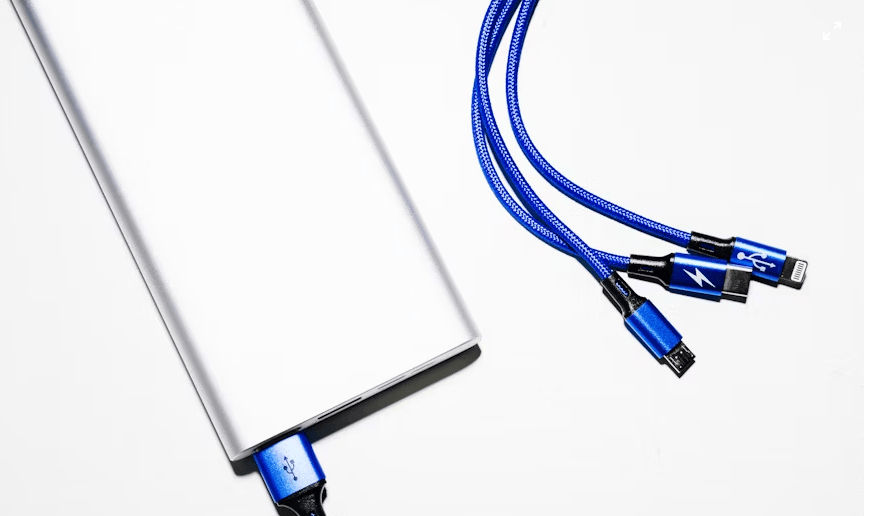
This includes power banks. Power banks ensure that your devices never run out of power, as you use navigation apps, translations, and other types of apps while abroad. So, make sure you have a power bank with you, and go for a high-capacity option that allows you to charge your phone several times.
In addition to the power bank, a signal booster can also come in handy, especially if you are planning a trip to a remote or rural area where the signal is poor. Also, if you are traveling with family and want to share data with multiple devices, consider a portable wi-fi.
Security tips: VPNs, public Wi-Fi risks, protecting your data on the go
When staying connected online while abroad, you need to do it safely. And using free public wi-fi is not always the best option. That’s because public wi-fi comes with the risk of data interception and hacking.
But if you decide to use the public wi-fi, do it safely. You can do that by:
- Using a VPN to encrypt your internet traffic and hide your activities from prying eyes.
- Sticking to HTTPS websites for safe browsing
- Avoid accessing sensitive information, such as banking details or passwords, on public networks.
- Keep your anti-virus software up-to-date.
Photo & sharing hacks: backing up photos, sharing with family, staying connected socially
Travel memories are priceless, and the last thing you want is to lose them. So, always use cloud backups, such as iCloud or Google Photos, to automatically save your photos whenever you are online. This will ensure that even if you lose your phone, your photos will still be safe.
In addition to backing up your photos, these apps, such as Google Photos, allow you to create albums of your trip. So, you can place the best photos in those albums, then send them to your family through social media platforms and messaging apps.